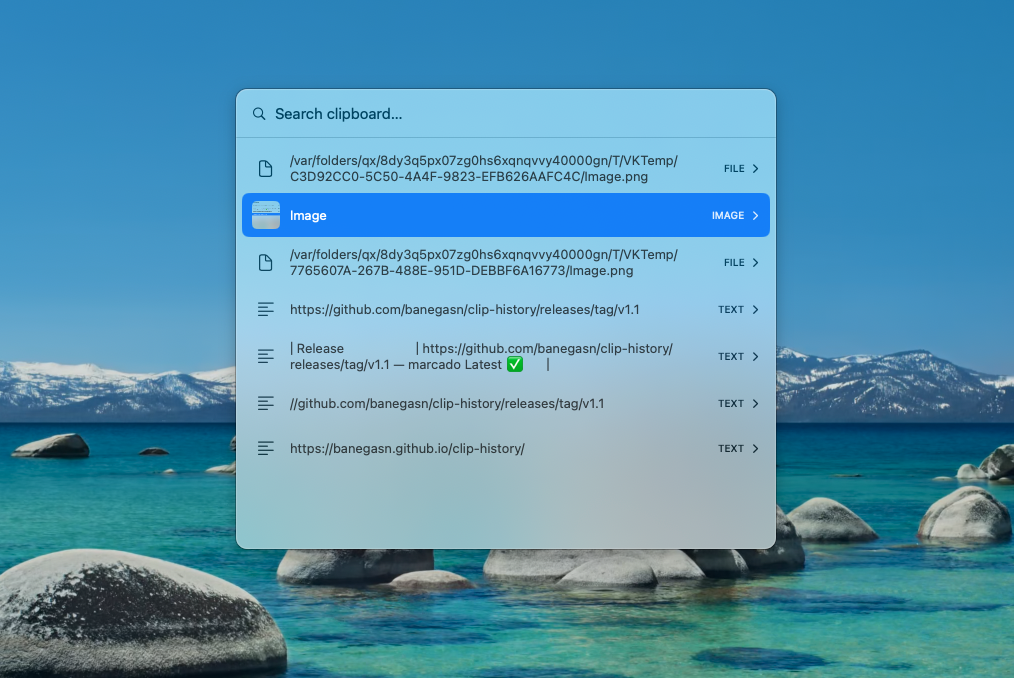
Small app, complete clipboard.
⌨️
Global hotkey
⇧⌘V opens a centered, searchable panel from any app.
🧲
Text, images & files
Plain & rich text, screenshots and images, and copied Finder files.
💾
Persistent
SQLite-backed history that survives reboots, capped at the 200 most recent items.
⚡
Paste in place
Pick with ↵ and it pastes straight into the app you were just using.
📌
Pin your favorites
Pin clips with ⌘P — they stick to the top and survive the 200-item cap. ⌘⌫ deletes, → expands.
🔒
Private by design
Skips password-manager clips. No network connections — everything stays local.
Built for your hands.
⇧⌘VOpen / focus the history panel
↑ ↓Move the selection
→Expand a clip’s full content (Open Link button for URLs)
← / EscBack from detail · dismiss the panel
↵ EnterPaste the selection into the previous app
⌥↑ / ⌥↓Jump 5 rows at a time
⌘PPin / unpin — favorites float to the top, never evicted
⌘⌫Delete the selected entry from history
type…Filter the history
Up and running in a minute.
- Download & drag to ApplicationsGrab the latest .dmg, open it, drag ClipHistory into Applications.
- Open it the first timeIt isn’t notarized by Apple, so open System Settings ▸ Privacy & Security and click Open Anyway (or run
xattr -dr com.apple.quarantine /Applications/ClipHistory.app). - Grant AccessibilityWhen asked — System Settings ▸ Privacy & Security ▸ Accessibility → enable ClipHistory. Needed so it can paste with ⌘V.
Prefer building from source?
./setup-signing.sh && ./build-app.sh — see the README.How it works.
🔁
Detect copies
Polls NSPasteboard.changeCount — macOS has no clipboard-change event.
🎯
Global shortcut
Carbon RegisterEventHotKey — system-wide, no permission to listen.
📥
Paste back
Re-activates the prior app, then posts a synthetic ⌘V via CGEvent.
🗄️
Storage
SQLite in Application Support; images as PNG blobs, thumbnails in memory.